Storing Data: Variables
This topic introduces the idea of storing data whilst a program is running.
Getting Started
Take a look at this game screen. Now think about what items of data the game program has to keep track of as the game is running - try to identify at least three items before moving on
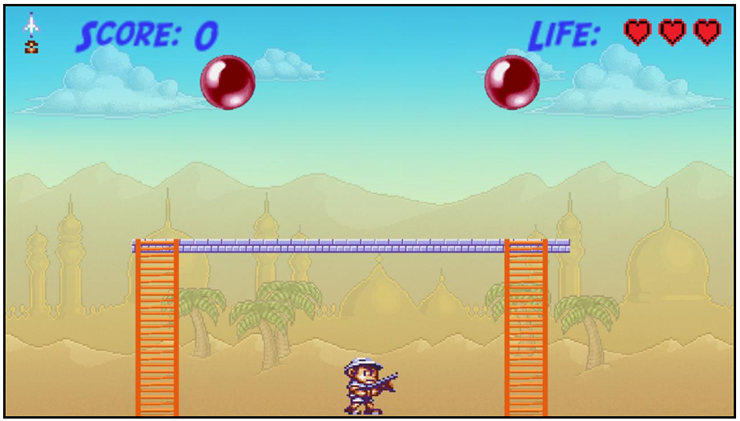
To reveal some of the answers double click your mouse on the image
You will hopefully have come up with a few of the items the program keeps track of. Each one of these is called a variable - because the values can change as the program is used
A variable is a named location where we store data. This data can change (or vary) throughout the lifetime of the program.
Look closely at this image to give you a mental model of what a variable is
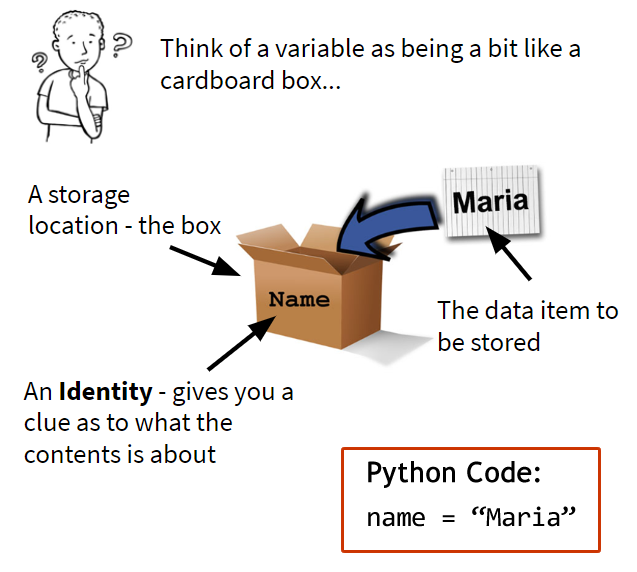
In a computer program there is no actual cardboard box, but there is storage space set aside in the RAM. So data can be stored for later use by giving it a name to refer to it.
The computer will look up the stored data everytime it comes across the name and substitute in the program
Look at the code area and press Run. Afterwards watch the video clip
Video explaining data types

In this activity you will create a simple program that makes use of different data types. Use the code area to carry out your investigation
The program should do the following:
- Set up the name of the player
- Set up a variable containing an integer number
- Sets up a variable that is the tripple of the number
- Print out all of the data like it is shown below
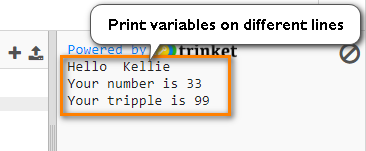
Try to do this yourself - but here is a hint (only part of the code).
Code hint for Activity 3.1
tripple = number * 3
.
.
print("Your tripple is", tripple)
Video commentary on Activity 3.1
Here is the code area for you to use to solve this problem
Write a python program that converts temperatures in °C into °F.
The program needs to store the following items of data using labels (variables):
- Temperature in °C
- Temperature in °F
The temperature in °F can be calculated from the temperature in °C by the following calculation:
Code hint for Problem 3.1
degreesF = (degreesC * 1.8) + 32
The program should output like this:
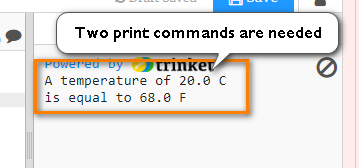
Your code from Activity 3.1 is a good starting point as this has a calculation in it. You only need two print commands instead of three
Video commentary on Problem 3.1
Go to the workbook for this module in your Google Classroom. All answers need to be placed in there.
You will need to include the following items:
- A screenshot of the code for Activity 3.1 showing it working
- A screenshot of your final code for Problem 3.1 showing it working